Category: Vivero Blog Writing

Blog posts relating to my time and process as a Vivero Digital Fellow!

  • Returning to Omeka.

    9/14/25

    This week for my behind the scenes Vivero work, I returned to some training on the website/database host Omeka. I followed along though the training from last year and then followed along the Omeka, Part 2. training for a bit more work. Most of the stuff I’ve come to pick up a little bit through my project work on Virtual Tithead, but nonetheless it was helpful and relevant to my project to go back. Something that I am thinking about for this year is how best to display the kind of information on the kind of site we want for the Virtual Tithead Project. As of now, we have information stored on an Omeka site, but it isn’t exactly what we’d like it to look like, nor exactly the information we’d like displayed. I wanted to go back through this Omeka training to see if there were more pointers for site customization or if it was possible to have a bit of a sleeker-looking website, but I was unable to find anything in the trainings on deep customization, that is, without learning HTML, potentially complex HTML, to make it work. I think my feedback for the training would be to bulk out the site customization a bit, in addition to the training on how to create exhibits and add items. That being said, I’m still not sure if Omeka is exactly the right way to go with our project, and as my project lead and I discussed last year, we may play around with different options.
  • Starting Back Up!

    9/08/25

    And we’re back! Time to get started up again with Vivero. I’m super excited to get going on work this year and even more excited to start up on Virtual Tithead again. This week my blog post is about advice to new Fellows about the idea that this job involves a pretty significant amount of improv and figuring it out on the fly. As someone who does a not unsignificant amount of theater and arts, this came to me relatively easy, but it doesn’t for everyone. Certainly when I started out, it was harder. I think my best advice comes in three pieces.

    1. Be in a state of learning! Ask tons of questions, follow through with the things you find yourself enjoying, and take in what you learn from your job training. The learning curve can be pretty steep with some of the software we use, but with time (and clicking literally everything) you will find you way through it.
    2. It’s okay to be wrong. It’s better to know when you’ve made a mistake with something and improve then it is to pretend there’s no problem in the first place. If you don’t know the right answer to a question you’re faced with, that’s okay! Be honest. Sometimes saying, “Huh. I don’t know, but maybe we can figure it out,” is the best thing you can do. Remember, Google’s your best friend.
    3. Have fun with it! The more you find little ways to have fun in the not knowing exactly what to do, the more useful and productive you’ll find the time you spend on your projects, drop-in hours, training, etc. will be. It’s worth it to find the little reasons. Personally, I’m a great fan of artistic endeavors, so finding ways to incorporate that always heightens my experience.

  • End of Semester Reflections

    5/10/2025

    This semester has been both a great challenge and great learning experience for me, not just in my position with Vivero, but in my position as a student as well. I’ve learned so, so much about time management, discipline, and knowing when and where to give myself grace. This semester was a bit of a perfect storm of incidents for me—between family health matters, personal health issues, difficult classes, and people important to me being far away, I struggled a lot with aspects of college that I’ve not struggled with in the past. I think the most important thing I’ve learned this semester is how important it is to be a bit more patient with myself while also holding myself to the small things that are tedious, but make life better. If I could give some advice to myself at the beginning of the semester, I’d remind myself that sometimes being good to myself and lessening stress later means doing something that I find hard to do now, but equally, that the hard thing shouldn’t be unrealistic. Holding myself to standards that are unreasonably high, is not going to help me do good work, particularly in work settings.

    As for the training model of Vivero, I actually really enjoyed it. I struggled sometimes to keep up the pace throughout the semester when certain weeks got harder than others, but all in all, the consistent learning and training was actually pretty fun. I was always working on something new and I enjoyed that, though I may have needed a break sometimes. There was very little that I found confusing or unhelpful—everything was well documented and easy to follow along with. Training was genuinely fun!

    As for my next steps in project work next semester, I’ve detailed a lot of my plans and the ideas we’ve floated around this semester in a large documentation file. It details most of the work I’ve done this semester, answers to questions that I struggled with but ultimately solved while working, an overview of the project as a whole, and where I think the project could go from here based off of my conversations with my project leader. That file is saved in my project’s storage files and hopefully will be of use to myself or someone else later.

    I think for next year I’m most excited to continue doing project work and more advanced trainings for some of the programs we have already looked at. For things I’ve already worked on, I really want to improve my understanding of WordPress, and also ARCGis, but there’s also so many more programs that I’m excited to dip my time into!

    That’s all for now! Until next semester…

  • Reflections on Revisiting Documentation

    5/4/2025

    This week I revisited documentation while working on my project documentation for the end of the semester. I worked on building up a substantial document detailing most of the work I’ve done this semester, answers to questions that I struggled with but ultimately solved while working, an overview of the project as a whole, and where I think the project could go from here based off of my conversations with my project leader. Ultimately, I think I was pretty successful with it! Either way, it’s got all the info I wanted to put on it, and I think it’s relatively understandable.

    I feel a lot better about documentation now. Before I was sort of confused by the rigidity of it all, but also found it to be slightly mindless. Now, I feel like I have a much better grasp of how to do thorough documentation and explanation while still being engaging to my reader and communicating the information that needs to come across. In truth, I actually really enjoyed compiling this and wonder how I might be able to do more in the future.

  • Reflections on ARCGis Storymaps

    4/27/2025

    I’m actually quite familiar with Storymaps and really enjoy using it for various projects. I was first introduced to it in Professor Kapila’s Travel Narratives class and have used it for a number of classes since then. I feel quite comfortable helping someone else learn how to use this program, and I actually thoroughly enjoy working in it, so no problems there. As for benefits and limitations of this tool, I think there are a great deal of wonderful things about being able to use a map alongside detailing information–primarily in how you can represent different data and create a visually interesting presentation–though there is the downside of being pretty hard to load and move through. I’ve done a number of project where by the end, my Storymap has a hard time loading with the sheer amount of stuff in it. I think accessibility wise, Storymaps can be quite difficult, but also doesn’t necessarily need to be. Considering that it is a very visual-heavy program, making sure that colors are high contrast but not offensive to the eyes, and that images have captions and alt text is very important. Storymaps can get really complex really quickly, but as long as you keep track of what you’re doing as you do it, they tend to turn out fine.

  • Reflections on Audacity

    4/20/25

    In a blog post on your portfolio site, reflect on the experience of learning how to use Audacity for audio editing. How would you feel about helping someone else learn how to use it? What did you find most interesting? What did you find most frustrating? What questions do you still have, and what parts of the tool do you want to explore more deeply?

    I looooooveee Audacity. It’s one of my favorite softwares out there and every day I am happy that it is a free service. I’ve been using it since high school, and it is always my go-to for anything where I may need to do any kind of audio editing. I use it for video backings, podcast, straight audio editing, etc. It’s such a fun and accessible program, and I use it constantly. I feel very confident in helping someone else learn how to use Audacity–I’ve got a lot of the fundamentals down including how to soften and amplify audio, as well as do sound generation or reduction, overlay and splice tracks, include effects, etc. I have a lot of fun with it, and I’m confident I could help someone figure out whatever they wanted to use it for. I really don’t fund Audacity all that frustrating, perhaps because I’ve been using it for a while, but I remember when I first started using it that I didn’t like how you couldn’t really tell what buttons were unless you hovered over them. Luckily, that’s just something you learn over time, so it doesn’t frustrate me at all anymore. I think something I want to explore more with audacity is metadata–I know that audacity files can carry a lot of it, so I want to find out more where I can add and subtract metadata in my own files.

  • Reflections on WeVideo

    4/20/2025

    In a blog post on your portfolio site, reflect on the experience of learning how to use WeVideo for video editing. How would you feel about helping someone else learn how to use it? What did you find most interesting? What did you find most frustrating? What questions do you still have, and what parts of the tool do you want to explore more deeply?

    In full honesty, I am really not a big fan of WeVideo. I’ve done a fair bit of audio and video editing throughout my life so far for various projects, personal or academic, and WeVideo is definitely not my favorite. I much prefer Capcut (free option) or Adobe Premiere (paid). That being said, I definitely feel as though I could walk someone through making a video on WeVideo and would be happy to do so. I do think that the feature of being able to work collaboratively is very interesting, given that few other video editing softwares have that as an option. In that sense, I find WeVideo interesting, and fulfilling a niche that does not have many alternatives. In terms of what I didn’t like about it however, I’m just really not a fan of in-browser video editing and I find that the UI is usually relatively clunky and build to produce videos that don’t really look that good–even though Capcut or Premiere are a bit harder to learn how to use in a single afternoon, they turn out videos that look much better, and usually the software runs a lot smoother. I am also not a huge fan of their exporting system. I’d much rather export the video myself than wait in a que and receive an email, but that is just me. I think if I were to explore WeVideo more, I’d look into options to make the videos look better, and see if by exploring more the available content, there were ways to make videos look a bit more polished. If there are options to make it look better, I think WeVideo could be a really good option for video editing, and something to utilize more in my own personal work.

  • Reflections on Gale Digital Scholar Lab

    4/18/2025

    How would you feel about helping someone else learn how to use Gale Digital Scholar Lab? What did you find most interesting? What did you find most frustrating? What questions do you still have, and what parts of the tool do you want to explore more deeply?

    I definitely feel as though I could walk someone through the process of learning the basics of Gale Digital Scholar, and, given time to hear very specifically what they were looking for, could also help them find more in-depth analyses that best suited their research. Also, if a person just wanted to see any or all connections between their work, I could definitely walk them through running any of the analyses they wanted to, regardless of whether they were looking for something specific. I actually found the whole process of using Gale to be quite interesting, though at the moment, I can’t think of any project in specific I’d use this for myself. It opens up a lot of options for analysis in scientific papers or humanities based projects–particularly those research heavy, and perhaps looking into similarities of different topics. I think the most frustrating part to me was the UI, but even that wasn’t so bad once I worked through the system a bit more. I find that often times, research platforms and database related websites tend to have clunky UIs on account of how much content they need to hold, but either way, it seems alright once I spend more time in them. I’d really like to use Gale more, potentially for some of my own projects, to see how it can be utilized more in Arts and Theatrical work.

  • Reflections on Vivero/Project Documentation

    4/6/2025

    After both reading and writing documentation, what do you think is necessary to create good documentation? What documentation will you and your project lead need to create for your Vivero project – and what steps do you need to take to make this happen?

    I think that writing in both very specific, but very simply language is most necessary for creating good documentation–assuming that your reader will be able to follow along, but not needlessly complicating the steps that it takes to complete a process. I think the documentation that will most help with my project right now, and perhaps something I should write, would be to complete detailed documentation on how to access the Virtual Tithead database, as a lack of collected and specific enough documentation on that has cause some little hiccups in the flow of work (Nothing major! I’m just lost in Finder files). I also think a really important thing about documentation, and specifically about the documentation of the project I am working on, is to make sure it is all collected in a place where it can be easily accessed. Even if you create spectacular documentation, it can’t help anyone if it can’t be found. I think that the steps I will need to take to improve the documentation for the Virtual Tithead Project is to work through accessing the database step by step, writing down the documentation as I go, and ensuring it can be found with relative ease for whichever fellow works next on the project!

  • Reflections on Data Analysis with Excel

    4/6/25 (Completed on 3/8/25)

    Explore the AutoSum functions with other data fields. How do these calculations impact or inform your understanding of the data? What questions do you have about the data or calculations?
    – The AutoSum functions work as a very solid way to quickly find numerical trends, averages, etc. I think that in terms of impacting or informing my understanding of the data, it serves as a very solid way to gain a full view of the data, but maybe lacks the careful eye of pruning through data sets one-by-one to most holistically view data. I think that maybe doing Data Visualization in addition to AutoSum will provide a wider understanding of the rows and rows of numbers.

    What types of visualizations were you able to generate in Excel using PivotChart? How could those visualizations shape or impact your understanding of the data? Did you generate any visualizations that were confusing or misleading? Alternatively, did you generate any visualizations that were unexpected or illuminating?
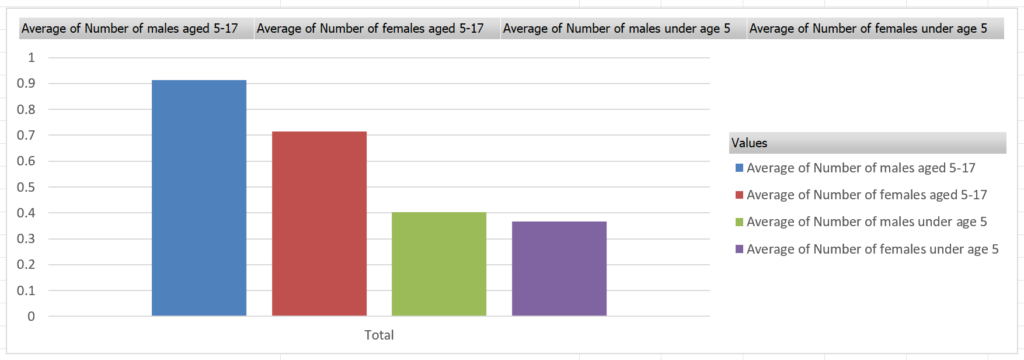
    – Another visualization I generated was comparing the average amount of minors (children) in each household, and found that elder sons were most common and younger daughters were least common. These visualizations can help shape or impact understandings of the data as they can take pure numerical data and create visual, and easy to understand, comparisons. Rather than simply numerically analyzing the data, using visualizations, you can analyze specific comparisons–rather than seeing the average amount of males age 5-17, you can visually compare that number with others, creating a new quantifiable set of data to analyze.